This guide provides a comprehensive walkthrough for building and deploying edgeCore 5.1.1 using Docker and Docker Compose. It combines the steps for preparing and building the Docker image with detailed deployment, configuration, and operational guidance. The goal is to ensure a consistent, secure, and repeatable deployment process for both internal and external users.
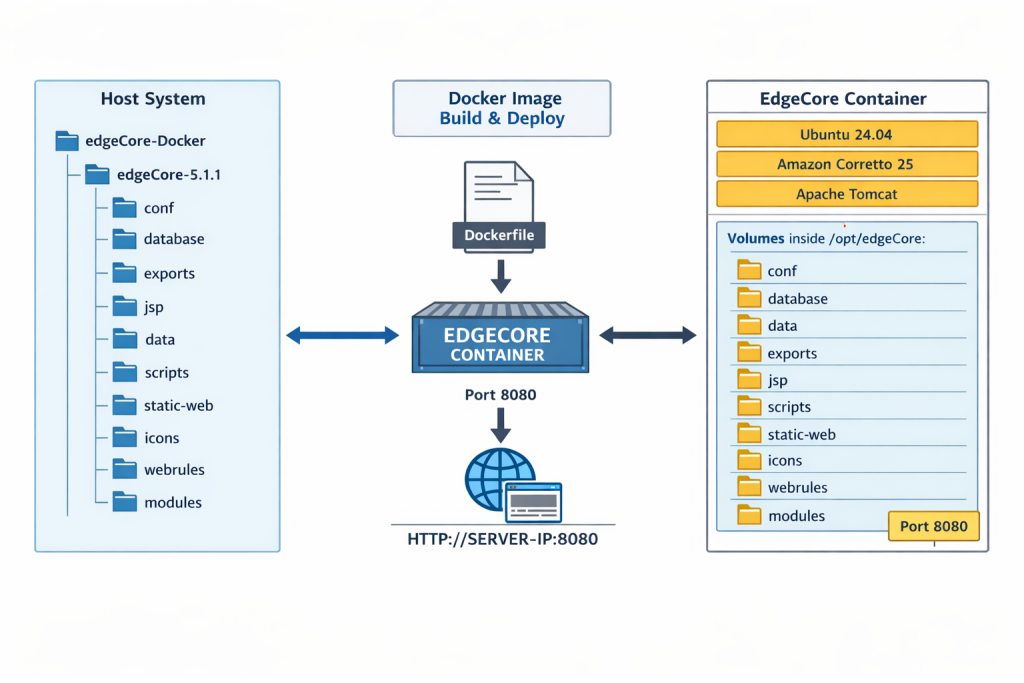
Building the Docker Image
Preparing the Application Files
edgeCore is distributed as a ZIP archive. Before building the Docker image, the application must be unpacked.
Bash
mkdir -p edgeCore-Docker/edgeCore-5.1.1
# Move your zip file into the directory
cp edgeCore-5.1.1.zip edgeCore-Docker/ cd edgeCore-Docker
# Unpack the application
unzip edgeCore-5.1.1.zip -d edgeCore-5.1.1/
rm edgeCore-5.1.1.zip
Creating the Dockerfile
Inside the edgeCore-Docker directory, create a file named Dockerfile with the following content:
Dockerfile
# ---------------------------------------------
# EdgeCore 5.1.1 Dockerfile (Ubuntu 24.04 + Java 25
# Pre-unpacked version
# ---------------------------------------------
FROM ubuntu:24.04

# -----------------------------
# Environment variables
# -----------------------------
ENV EDGECORE_HOME=/opt/edgeCore
ENV TOMCAT_USER=edge
ENV TOMCAT_GROUP=edge
ENV LANG=en_US.UTF-8
ENV LANGUAGE=en_US.UTF-8
ENV LC_COLLATE=C
ENV CATALINA_HOME=$EDGECORE_HOME/tomcat
ENV PATH=$CATALINA_HOME/bin:$PATH

WORKDIR $EDGECORE_HOME

# -----------------------------
# Install minimal dependencies
# -----------------------------
RUN apt-get update && \
    apt-get install -y wget curl telnet procps findutils sudo locales tar && \
    locale-gen en_US.UTF-8 && \
    apt-get clean && rm -rf /var/lib/apt/lists/*

# -----------------------------
# Install Java 25 (Amazon Corretto)
# -----------------------------
RUN mkdir -p /opt/java && cd /opt/java && \
    wget -q https://corretto.aws/downloads/latest/amazon-corretto-25-x64-linux-jdk.tar.gz -O corretto-25.tar.gz && \
    tar -xzf corretto-25.tar.gz && \
    mv amazon-corretto-25* java-25 && \
    rm corretto-25.tar.gz

ENV JAVA_HOME=/opt/java/java-25
ENV PATH=$JAVA_HOME/bin:$PATH
ENV JAVA_VERSION=25

# -----------------------------
# Create edge user
# -----------------------------
RUN groupadd -g 1001 $TOMCAT_GROUP && \
    useradd -m -u 1001 -g 1001 -s /bin/bash $TOMCAT_USER

# -----------------------------
# Copy pre-unpacked EdgeCore
# -----------------------------
COPY edgeCore-5.1.1/ $EDGECORE_HOME/

# -----------------------------
# Prepare runtime/shared folders
# -----------------------------
RUN mkdir -p $EDGECORE_HOME/database \
             $EDGECORE_HOME/exports \
             $EDGECORE_HOME/logs \
             $EDGECORE_HOME/shared \
             $EDGECORE_HOME/shared/data \
             $EDGECORE_HOME/shared/scripts \
             $EDGECORE_HOME/shared/modules \
             $EDGECORE_HOME/shared/static-web \
             $EDGECORE_HOME/shared/webrules && \
    cd $EDGECORE_HOME && \
    for dir in data scripts modules static-web webrules; do \
        rm -rf $dir && \
        ln -s shared/$dir $dir; \
    done

# -----------------------------
# Permissions
# -----------------------------
RUN chown -R 1001:1001 $EDGECORE_HOME && \
    chmod -R g+w $EDGECORE_HOME

USER 1001:1001
WORKDIR $EDGECORE_HOME

# -----------------------------
# Entrypoint
# -----------------------------
CMD ["bin/edge.sh", "run"]
Dockerfile Summary
The Dockerfile performs the following key actions:
- Uses Ubuntu 24.04 as the base image.
- Installs minimal runtime dependencies and Amazon Corretto Java 25.
- Creates a dedicated edge runtime user.
- Copies the pre-unpacked EdgeCore distribution.
- Creates shared runtime directories for persistent data.
- Starts the server using bin/edge.sh run.
Building and Verifying the Image
Run the following command from the directory containing the Dockerfile:
Bash
docker build -t edgecore:5.1.1 .
Verification Steps:
- Check image: docker images
- Test run: docker run -d -p 8080:8080 –name edgecore-test edgecore:5.1.1
- Confirm logs: docker logs edgecore-test
Docker Deployment
This section describes how to build and run edgeCore 5.1.1 using Docker and Docker Compose. The instructions were validated using the following environment:
Components:
- edgeCore: 5.1.1
- Operating System: Ubuntu 24.04
- Docker Engine: 29.2.0
- Docker Compose: v5.0.2
- Java Runtime: Amazon Corretto 25
Architecture Overview
edgeCore runs inside a Docker container based on Ubuntu 24.04 with Amazon Corretto Java 25. Application data and configuration are stored outside of the container using mounted host directories. This ensures persistence across restarts and upgrades.
Typical host directory structure:
edgecore-5.1.1/

 ├── docker-compose.yml

 ├── conf/

 ├── database/

 ├── exports/

 ├── jsp/

 ├── data/

 ├── scripts/

 ├── static-web/

 ├── icons/

 ├── webrules/

 └── modules/
The conf/ directory contains runtime configuration, SSL certificates, and environment variables. Separating configuration and data from the container allows easier upgrades, certificate management, and backup integration.
Prerequisites
Ensure Docker and Docker Compose are installed:
Bash
docker version

docker compose version
Example tested versions:
- Docker Engine: 29.2.0
- Docker Compose: v5.0.2
Running edgeCore with Docker Compose
Example docker-compose.yml:
services:

  edgecore:

  image: edgeCore:5.1.1

  container_name: edgecore

  ports:

  - "8080:8080"

  volumes:

  - ./database:/opt/edgeCore/database

  - ./exports:/opt/edgeCore/exports

  - ./jsp:/opt/edgeCore/jsp

  - ./data:/opt/edgeCore/data

  - ./scripts:/opt/edgeCore/scripts

  - ./static-web:/opt/edgeCore/static-web

  - ./icons:/opt/edgeCore/icons

  - ./webrules:/opt/edgeCore/webrules

  - ./modules:/opt/edgeCore/modules

  - ./conf:/opt/edgeCore/conf

  restart: unless-stopped
Start edgeCore:
docker compose up -d
Stop edgeCore:
docker compose down
Check container status:
docker ps
Accessing edgeCore
Once running, access edgeCore via:
http://SERVER-IP:8080
Example:
http://localhost:8080
Configuration
Runtime configuration is controlled via:
conf/environment.sh
Example parameters:
- HTTP_PORT=8080
- JAVA_MEMORY_MAX=2662
- JAVA_MEMORY_INIT=2662
- EDGE_SERVER_STANDALONE=true
- EDGE_SERVER_MODE=standalone
Additional features can be enabled with environment variables:
- EDGE_SERVER_RPA=true
- EDGE_SERVER_AI_ASSIST=true
Database Information
edgeCore 5.1.1 uses the embedded H2 database.
Database files are stored in: database/
Inside the container: /opt/edgeCore/database
Since this directory is mounted as a volume, data persists across container restarts.
Backup and Restore
edgeCore provides a built-in backup functionality via:
- UI: Backup → Full backup
- edge CLI tools
Always perform a backup before upgrades or major configuration changes. Refer to the official edgeCore Backup documentation for restore procedures.
Logs
View logs:
docker logs -f edgecore
or
docker compose logs -f
Security Recommendations
- Run edgeCore behind a reverse proxy or load balancer
- Enable HTTPS with valid SSL certificates
- Restrict exposed ports (only expose what is necessary)
- Regularly update Docker images and host OS
- Use non-root users inside the container where possible
- Apply least privilege to mounted volumes
- Maintain regular backups and test restore procedures
- Monitor container logs and resource usage for anomalies
Troubleshooting
-
Container fails to start:
docker logs edgecore
- Port conflict (8080 in use):
Modify port mapping in docker-compose.yml:
ports: – “8081:8080”
Then access via http://SERVER-IP:8081 - Unzip errors during build:
Ensure the archive is valid and fully copied before extraction. - Java runtime issues:
Confirm the base image includes the correct JRE (Amazon Corretto 25).